Start with the home network
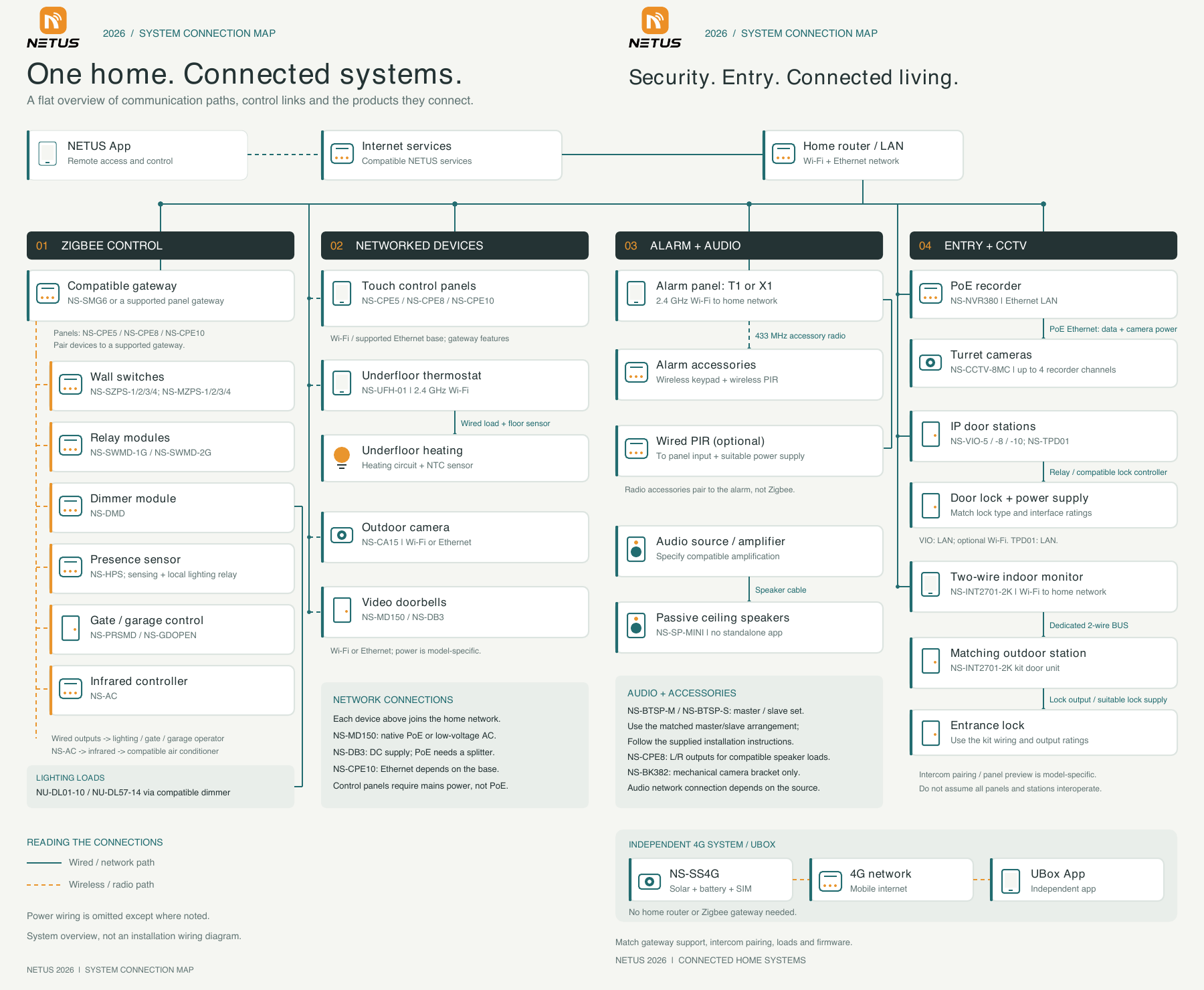
The map links the NETUS app and compatible internet services to your home router and LAN. Devices then follow different paths: some pair to a gateway, some join Wi-Fi or Ethernet directly, and others connect to a dedicated alarm, intercom or audio system.
Solid lines show wired or network paths; dashed lines show wireless or radio paths. Most power wiring is omitted. This is a system overview, not an installation wiring diagram.
01 / Zigbee control
App or control panel → supported gateway → paired Zigbee device → wired load or control output.
Pair compatible wall switches, relay modules, the NS-DMD dimmer and NS-HPS presence sensor to an NS-SMG6 or a supported panel gateway. The map includes NS-SZPS and NS-MZPS wall switches and NS-SWMD relay modules. Gateway support must be checked for each model.
Lighting, gate and garage equipment still needs the appropriate wired output. NU-DL01-10 and NU-DL57-14 downlights connect through a compatible dimmer. The NS-AC uses infrared for the final connection to a compatible air conditioner; it does not replace the air conditioner's power wiring.
02 / Panels, heating and networked devices
Home router → Wi-Fi or supported Ethernet connection → networked device.
NS-CPE5, NS-CPE8 and NS-CPE10 panels provide a central interface for compatible devices. Ethernet availability depends on the panel and base; the NS-CPE10 requires a supported base for Ethernet. Control panels require mains power, not PoE.
The NS-UFH-01 joins 2.4 GHz Wi-Fi and uses wired connections to the heating circuit and NTC floor sensor. The NS-CA15 camera connects by Wi-Fi or Ethernet. A network connection and a power connection are separate requirements unless the device explicitly supports PoE.
03 / Video doorbells
Doorbell → home network → configured NETUS app access.
NS-MD150 and NS-DB3 use Wi-Fi or Ethernet, but their power arrangements differ. NS-MD150 supports native PoE or low-voltage AC. NS-DB3 needs a DC supply; a PoE installation requires a suitable splitter.
Choose the power and network method for the exact doorbell model before cabling. Confirm the configured calling, recording and entry-control functions with NETUS.
Explore doorbells and intercoms
04 / Alarm system
Wireless accessories → alarm panel by 433 MHz radio → home network by 2.4 GHz Wi-Fi.
The connection map shows T1 or X1 alarm panels. Compatible wireless keypads and wireless PIR sensors pair directly to the alarm panel using its accessory radio. They do not pair to the Zigbee gateway.
An optional wired PIR connects to a suitable panel input and power supply. Confirm the alarm panel, accessory compatibility and detector power arrangement as a complete system.
05 / Background music and speakers
Compatible audio source / amplifier → speaker cable → passive ceiling speaker.
NS-SP-MINI is a passive ceiling speaker and has no standalone app connection. The amplifier or source determines how the audio system connects to the network. Match speaker impedance and load to the amplifier.
NS-BTSP-M and NS-BTSP-S use their matched master/slave arrangement and supplied installation instructions. NS-CPE8 has L/R outputs for compatible speaker loads; confirm the proposed speakers and wiring before connecting them.
06 / PoE CCTV
Home LAN → NS-NVR380 recorder → PoE Ethernet → NS-CCTV-8MC cameras.
The NS-NVR380 supports up to four recorder channels in the illustrated system. PoE camera connections carry data and camera power over Ethernet. Connect the recorder to the home LAN for the configured network functions.
Plan camera positions, cable routes, recorder storage and the supported camera models together. NS-BK382 is a mechanical mounting bracket only; it does not provide network or control functions.
07 / IP intercom and two-wire entry
IP system: door station → LAN → compatible intercom endpoints. Two-wire kit: indoor monitor → dedicated two-wire BUS → matching outdoor station.
NS-VIO-5, NS-VIO-8 and NS-VIO-10 use LAN, with optional Wi-Fi where supported. NS-TPD01 uses LAN. Door unlocking connects through the appropriate relay or compatible lock controller and a suitable lock power supply.
The NS-INT2701-2K kit uses a dedicated two-wire BUS between its matching indoor and outdoor units; the indoor monitor joins home Wi-Fi. Use the kit's wiring and lock-output ratings. Intercom pairing and panel camera preview are model-specific: not every panel and door station can work together.
08 / Independent 4G camera
Solar panel + battery → 4G camera with SIM → mobile network → UBox app.
The camera shown as NS-SS4G in the map is listed as SS4G in the product catalogue. It operates through the mobile network and UBox app, independently of the home router and Zigbee gateway.
Check mobile coverage, the SIM and data plan, solar-panel placement and expected usage at the installation location.
Plan the connections before installation
Prepare your floor plan, exact product models, router and cable locations, power arrangements, lighting loads and door or gate operator details. Confirm gateway support, intercom pairing, firmware, speaker loads and interface ratings for the proposed system.
Find product datasheets and installation guides · Discuss your system with NETUS
NETUS / SYSTEM PLANNING
Smart Home Connection Guide
Understand how your products connect, which devices need a gateway, and where network, control and power connections differ. Use the NETUS 2026 system map below alongside the practical explanations.